
Gotransverse Self-Service Portal
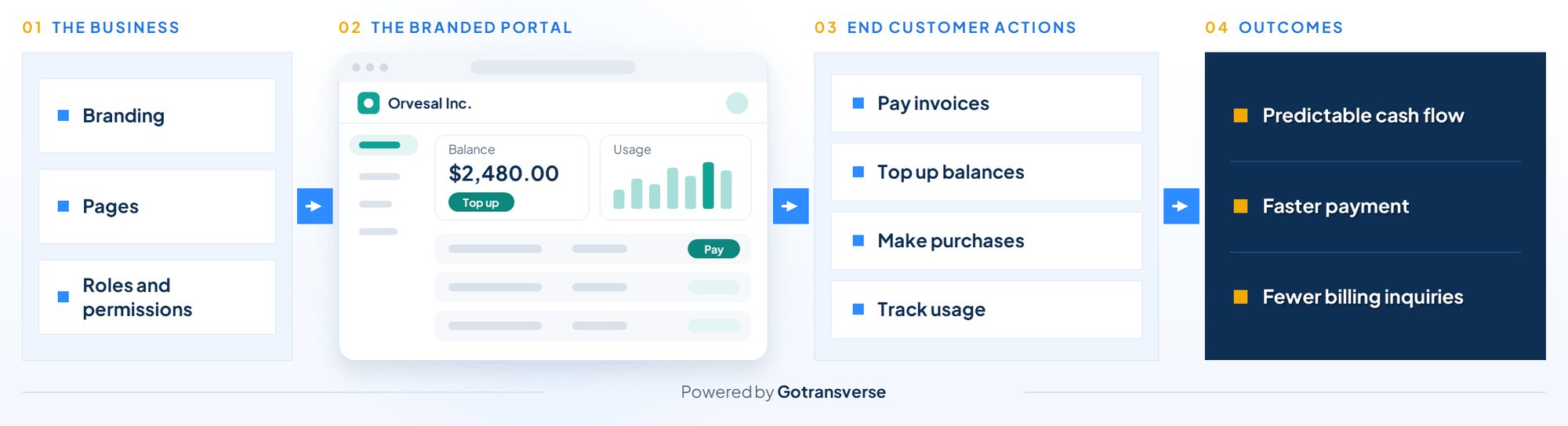
The Gotransverse Self-Service Portal drives revenue by giving customers a branded place to pay invoices, top up balances, and buy more on their own, so cash moves faster without adding work for billing teams.
.png?width=994&height=900&name=Self-Service-WhyItMatters_Modified%20(1).png)
Why It Matters
- End customers expect to check a balance, pay an invoice, or add service the moment the need arises.
- When those answers sit behind an email or phone call, payments slow, purchases get postponed, and billing teams absorb the follow-up.
- Every billing question that waits on a reply is revenue waiting too.
- The Gotransverse Self-Service Portal turns everyday billing interactions into faster payment, predictable cash flow, and lasting customer confidence.
Features

End customers top up balances and make additional purchases on their own. A customer running low on a prepaid balance, or ready to add service, should not have to wait to spend. Expansion revenue arrives on the customer's timeline rather than the next sales conversation.
Supported by: Balance top-ups; additional purchases.

Invoices, saved payment methods, and auto-pay in one place. Late payments often come down to friction, not intent. Making on-time payment the easy path supports faster collections and more predictable cash flow.
Supported by: Open, download, and pay invoices; payment history; payment methods and auto-pay.

Answers to routine billing questions, available on demand. “Where is my invoice?” and “What do I owe?” add up quickly. With balances, invoice history, payment confirmations, and order status on demand, finance and billing teams can focus on higher-value work.
Supported by: Account summary (account number, status, bill cycle, next invoice date, payment terms, current balance, pending charges, auto-pay status, tax exemption, addresses); invoice history; payment history; order status; active services and subscriptions; profile and contact details.

Usage visible throughout the billing cycle, right in the portal. When end customers can track what they’re using as they go, invoices bring fewer surprises and fewer questions.
Supported by: Consumption tracking for metered and usage-based services.

A portal that looks and runs as the business's own. End customers should feel they are dealing with the business they chose. Every interaction reinforces that relationship.
Supported by: Logo, colors, and fonts, or custom CSS; hosted on a branded URL.

Clear governance over who can see and do what. As more customers and users come online, oversight matters. Finance and IT teams gain the confidence to scale self-service.
Supported by: Custom roles and permissions down to individual actions, such as viewing invoices versus paying them; user management with account-level access; optional self sign-up linked to billing accounts by email; audit log of payments, orders, and invoice downloads.

Updates made quickly, without lengthy projects. As offerings change, teams adapt pages, messages, and branding to match.
Supported by: Pages built from content and live billing data blocks, and scheduled announcements.

Teams describe the change in plain language, and AI-assisted setup makes it. Instead of clicking through admin settings, a team can ask to rebrand the portal with new colors and a title, add a page that shows only open invoices, schedule a maintenance banner, or turn off online payment while keeping invoices visible. Changes to sign-in, payment settings, and hostnames are confirmed before they’re applied.
Supported by: AI-assisted setup using natural language.
Who This is For

Accelerate collections with online payment and auto-pay, and maintain oversight with an audit log of portal activity.

Reduce routine billing inquiries and open new self-service revenue through top-ups and additional purchases.

Deploy on the business's own website or a branded hosted URL, with role-based permissions, custom styling, and AI-assisted setup.
Gotransverse Self-Service Portal in Action

Services, bill cycles, and upcoming invoices at a glance. Clarity before every renewal.

Consumption tracked throughout the billing cycle. Fewer surprises at invoice time.
Balances topped up on the customer's schedule. Service and revenue that keep moving.

Sections and pages tailored to each offering. One portal for every pricing model.
A Billing Experience That Adapts as Fast as the Business
Discover how the Gotransverse Self-Service Portal speeds up payment, reduces routine requests, and adapts as offerings change.